One of the most common questions I ask myself when planning a LinkedIn campaign is also one of the hardest to answer: How much should we spend?
I used to think about this mostly in terms of minimum budgets. If you can spend $3,000, $5,000 or $10,000 a month, what can we realistically accomplish with it?
I still think those benchmarks are useful. In fact, we’ve written before about how much to spend on LinkedIn Ads. But after managing more campaigns, particularly for B2B companies with very specific target audiences, I’ve started approaching the question from the other direction.
Instead of starting with the budget, I start with the audience.
Once you've defined your audience, see whether your budget will let you reach it
Imagine you build a LinkedIn audience of 50,000 people.
A $1,000 campaign and a $10,000 campaign might technically target the exact same 50,000 people, but that doesn’t mean they have the same opportunity to reach them.
With a small budget, LinkedIn may only reach a portion of your audience. And within that portion, some people may see your ads several times while a large percentage of the audience never sees them at all.
That’s why I increasingly look at two metrics together:
- Audience penetration: What percentage of the target audience do I expect to reach?
- Frequency: How many times, on average, do I want those people to see the campaign?
LinkedIn itself now puts more emphasis on this type of planning. Its Media Planner forecasts reach, impressions and average frequency across different budget levels, and Campaign Manager also provides forecasted results based on factors such as audience, objective, schedule and budget.
Those forecasts aren’t guarantees, but they reinforce that budget, reach and frequency are connected.
The simple formula I use for LinkedIn budget planning
For an initial estimate, I use four inputs:
- Target audience size
- Desired audience penetration
- Desired frequency
- Expected CPM
From there, the math is straightforward:
Required impressions = Audience size × Target penetration × Frequency
Then:
Estimated budget = Required impressions ÷ 1,000 × CPM
For example, say I have:
- 50,000 people in my target audience
- A goal of reaching 35% of them
- A target frequency of 4
- An estimated $50 CPM
I would need approximately:
50,000 × 35% × 4 = 70,000 impressions
At a $50 CPM:
70,000 ÷ 1,000 × $50 = $3,500
So instead of saying, “I think we should spend $3,500,” I can explain why we need roughly $3,500 and what that budget is intended to accomplish.
I built a simple LinkedIn Ads Budget Calculator to make this easier. Enter your audience size, coverage target, frequency and expected CPM, and it estimates the total and daily budget required.
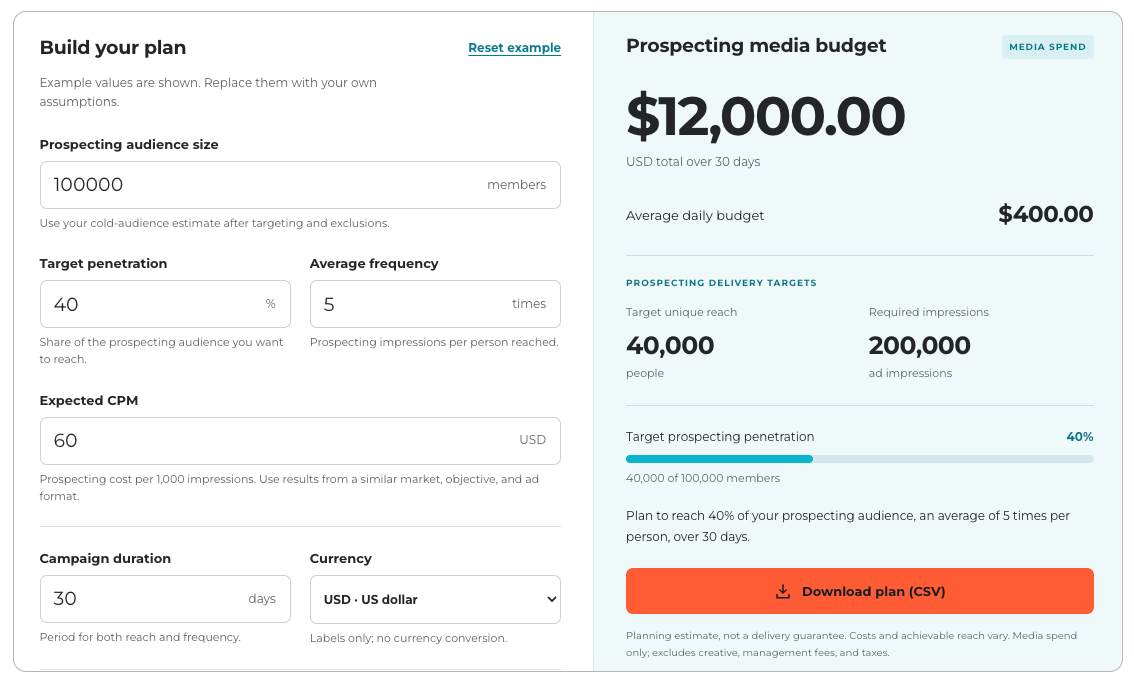
CommonMind's LinkedIn Ads Budget Calculator. Try it today.
What happens when the budget is too small?
This is where budget becomes a strategic decision rather than just a finance decision.
Let's say the math suggests that you need $6,000 to achieve the reach and frequency you want, but you only have $2,000 available.
I don't necessarily recommend spending the $2,000 the same way and hoping for the best.
Instead, you might:
- Narrow the audience to the highest-priority segment
- Focus on one geography (if you’re trying to target two or more)
- Run fewer campaigns simultaneously
- Reduce the penetration goal
- Reduce the desired frequency
- Extend the campaign duration
- Concentrate spend around the strongest creative or offer
This is especially important in B2B marketing, where it's easy to fragment a modest budget across too many audiences, funnel stages and ad formats.
Five campaigns with $1,000 each don't necessarily give you the same learning opportunity as one well-funded $5,000 campaign.
The budget needs to match the strategy.
CPM is a variable you don't fully control
The final input in the calculation is CPM.
Unlike audience size or your desired frequency, CPM isn't something you can simply choose. LinkedIn uses an auction system, so costs vary based on the audience, competition, objective, bidding strategy, geography and other factors. LinkedIn's advertising cost documentation explains how that auction works.
For an established account, I normally use historical CPM as the starting point.
For a new campaign, I use a reasonable planning estimate and then update the forecast once we have real delivery data, I like to start with LinkedIn's own Campaign Manager forecast.
How to estimate CPM for a LinkedIn campaign
To get a useful CPM estimate, create a draft campaign using the Brand Awareness objective and build the audience you actually plan to target. Then set the optimization goal to Impressions.
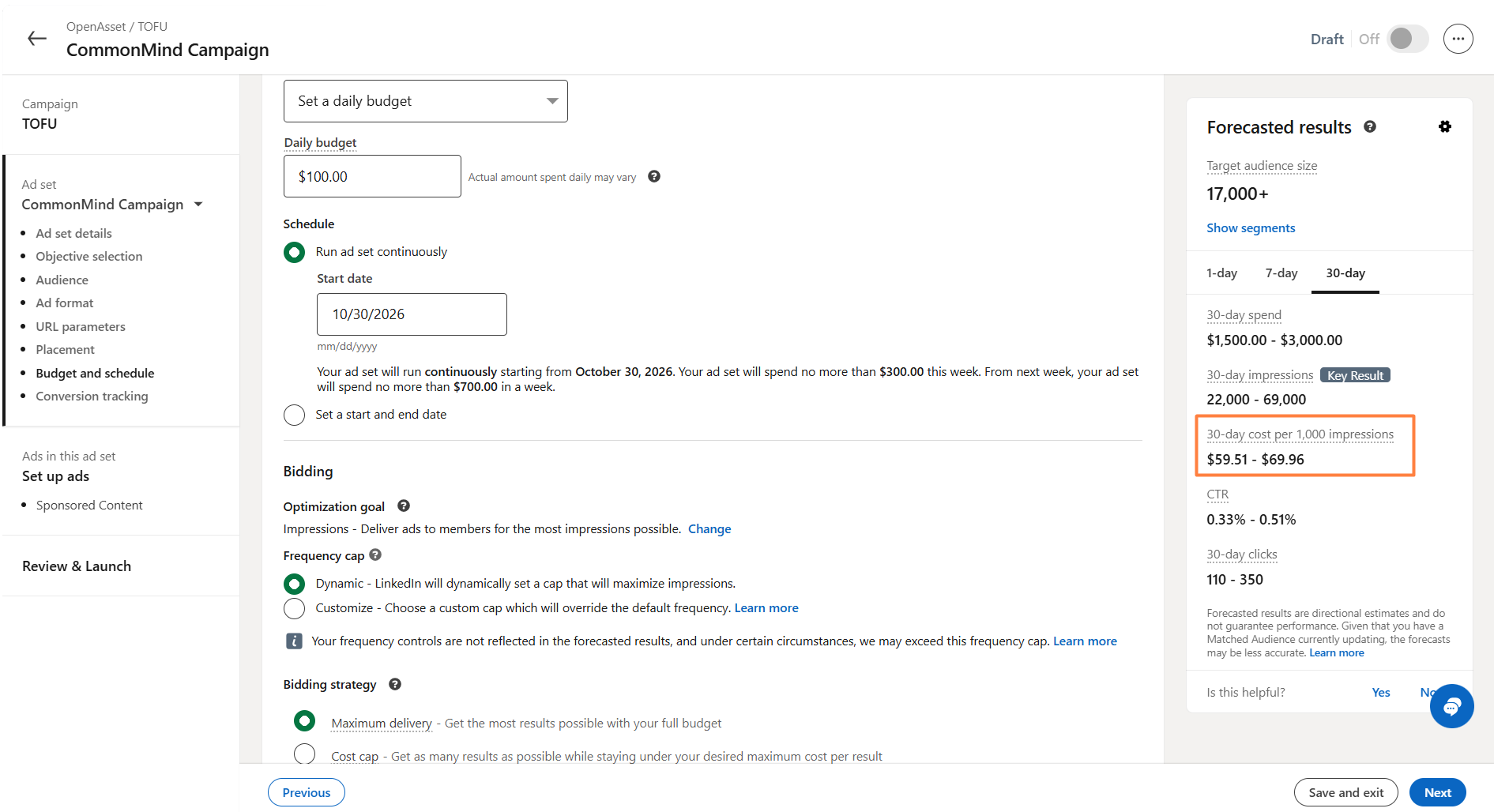
LinkedIn's Brand Awareness objective can optimize toward either reach or impressions. If you optimize for reach, LinkedIn forecasts the cost to reach 1,000 member accounts. If you optimize for impressions, the Forecasted Results panel gives you a projected cost per 1,000 impressions — essentially the CPM we need for the budget calculation.
I also select the ad format I expect to use and use Maximum Delivery as the bidding strategy unless I already have a specific bidding strategy in mind. LinkedIn's CPM forecast takes settings such as your objective, audience, ad format, bid, budget, and schedule into account, along with historical performance and similar campaigns.
Then take LinkedIn's forecasted cost per 1,000 impressions and plug that into the calculator.
It's still a forecast, not a guarantee of what you'll ultimately pay. But it gives you a CPM estimate grounded in the actual audience and campaign setup you're planning, rather than a broad benchmark that may have little to do with your market.
Budget should support the strategy, not define it
A Thought Leader campaign designed to build familiarity serves a different purpose than a retargeting campaign promoting a demo. A narrow target-account campaign has different constraints from a broad awareness audience.
For Thought Leader or awareness campaigns, the budget should be large enough to create meaningful reach and repetition. For example, I might plan around 40–50% audience penetration and a frequency of 3–5 over the campaign period. That creates a minimum budget needed to give the campaign enough scale to build familiarity.
For a retargeting campaign, the audience is smaller and already familiar with the brand. Here, the bigger risk is overspending and driving frequency too high. As a starting point, I typically allocate around 25% of the total LinkedIn budget to retargeting, with the remaining 75% going toward prospecting. From there, I would cap retargeting spend based on the size of the available audience and the amount of repetition I’m comfortable with.
The media budget should reflect those differences.
Taking action
Ready to set a budget and build your LinkedIn Ads campaign? Try CommonMind's LinkedIn Ads Budget Calculator to get an initial budget. If you have any questions about the calculator or your budget, please reach out. I'd love to hear from you.
Share this

LinkedIn Ads Targeting: How to Find the Perfect Audience
Why We Love LinkedIn Ads For Growing B2B Leads