.svg "Group 139 (1)")


I've managed more than $1 million in LinkedIn ad spend for B2B SaaS companies in the past year, and I ran into a problem that quietly wastes budget and is easy to miss in campaign-level reports:
A small number of large companies may be taking up a disproportionate share of your impressions.
Your campaigns might have healthy reach, CTR and engagement overall, but when you look at delivery at the company level, you may find that a few enterprise accounts have accumulated thousands of impressions while many other target companies have received relatively little exposure.
That doesn't automatically mean something is wrong. Large companies have more employees on LinkedIn, so they should naturally generate more impressions.
But when the same accounts repeatedly receive heavy exposure across multiple campaigns — especially without leads or conversions — it may be time to give those companies a temporary break.
LinkedIn's Companies Hub gives advertisers a way to do exactly that: a cooldown list. It's a dynamic company list of heavily exposed companies that you exclude from upper-funnel campaigns until their exposure drops.
What Is LinkedIn's Companies Hub?
Companies Hub is available under Plan → Companies in Campaign Manager. It provides company-level data including paid impressions, paid clicks, engagements, video views, leads and conversions.
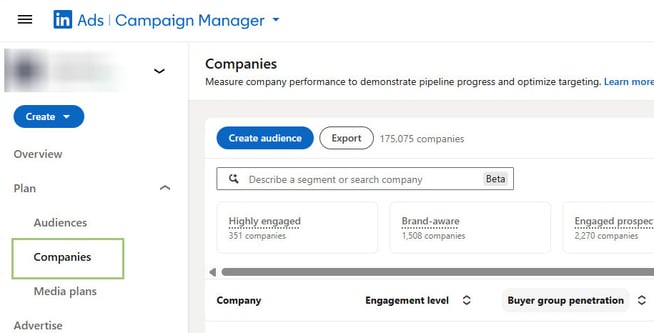
You can filter companies by metrics such as engagement, company size, industry, country, campaign and objective. LinkedIn also lets you choose rolling windows including the last 7, 30, 60, 90, 180 or 365 days.
More importantly, filtered results can be saved as either a static or dynamic company list. With a dynamic list, LinkedIn automatically updates the companies in the list based on the filters and time range you selected.
That creates an interesting opportunity for advertisers:
Instead of only using Companies Hub to find accounts you want to target, you can also use it to identify accounts you temporarily don't want to target.
The Problem: Your Campaign Frequency Can Look Fine While Company Distribution Isn't
LinkedIn already provides campaign-level reach and frequency metrics. Those are useful for answering questions like, "How often is the average member seeing my ads?"
But that doesn't necessarily tell you whether your budget is being distributed evenly across your target accounts.
I recently saw this with a B2B SaaS company where several companies had accumulated more than 5,000 paid impressions in a 30-day period, with the highest accounts exceeding 7,000. Meanwhile, smaller but still qualified companies weren't receiving sufficient exposure.
The campaigns targeted marketing and business-development professionals at a mix of large enterprise accounts and smaller firms across North America, the UK, and Australia.
The account was running several campaign types simultaneously, including Connected TV, Video View campaigns, Sponsored Content, Thought Leader Ads, retargeting, and lead-generation campaigns. At the campaign level, performance looked reasonably healthy. Reach was substantial, engagement was strong in several formats, and there wasn't an obvious single campaign that appeared to be causing a delivery problem.
When I drilled down further, another pattern appeared:
When I broke the top accounts' impressions down by campaign, I found that the problem wasn't always one campaign overserving an account. In several cases, the same company was being reached simultaneously through CTV, video, and Sponsored Content.
For example, one large company had accumulated significant exposure from both CTV and Video View campaigns, along with additional impressions from Sponsored Content. Another enterprise account received most of its exposure from a single content campaign plus a retargeting video campaign.
That raised two questions:
Are we continuing to create useful incremental exposure at these accounts, or are we repeatedly serving ads to companies we've already reached heavily?
And:
Could some of that inventory be redirected toward qualified accounts that have barely been reached at all?
Those questions led me to test a dynamic company-level cooldown strategy.
Think of It as a Company-Level Cooldown
A cooldown list doesn't permanently remove your largest target accounts.
It's a temporary exclusion inside LinkedIn Campaign Manager.
When a company receives unusually high exposure over a short period without generating a meaningful outcome, it enters the cooldown list (exclusion audience). As the rolling measurement window changes and the company no longer meets your criteria, the dynamic list updates automatically.
This gives other companies in the audience an opportunity to receive more impressions.
A reasonable starting framework might look like this:
|
Setting |
Starting point |
|
Measurement window |
Last 7 days |
|
Paid impressions |
1,500–2,000+ |
|
Paid leads |
0 |
|
Paid conversions |
0 |
|
Company size |
Optional guardrail for larger companies (e.g., 5,001+ employees) |
|
Exclude from |
Primarily CTV, Video Views and broad Awareness |
The 1,500–2,000 impression threshold is not a LinkedIn benchmark. It's a testing range derived from the distribution I've observed in real B2B accounts.
Every advertiser should determine its own threshold based on audience size, budget, company size and normal impression distribution.
Why Use a 7-Day Window Instead of 30 Days?
For reporting purposes, I like looking at company exposure over 30 days. It makes persistent patterns much easier to spot.
For a cooldown list, though, 30 days can be too slow.
Imagine an account receives a large spike in impressions during the first week of the month. With a 30-day rolling filter, those impressions continue counting toward the exclusion criteria for weeks.
The account may remain suppressed even though recent delivery has already dropped sufficiently.
A 7-day window reacts much faster.
A company experiencing unusually heavy delivery this week can enter the cooldown list. Once that recent exposure rolls out of the seven-day window, the company can become eligible again.
How to Set Up a Cooldown List in Companies Hub
1. In LinkedIn Campaign Manager, go to Plan → Companies.
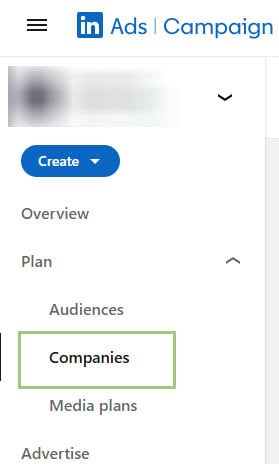
1. Set the time range to Last 7 days.
2. Open the filters and set a paid-impression threshold appropriate for your account; I might start around 1,500–2,000 impressions.
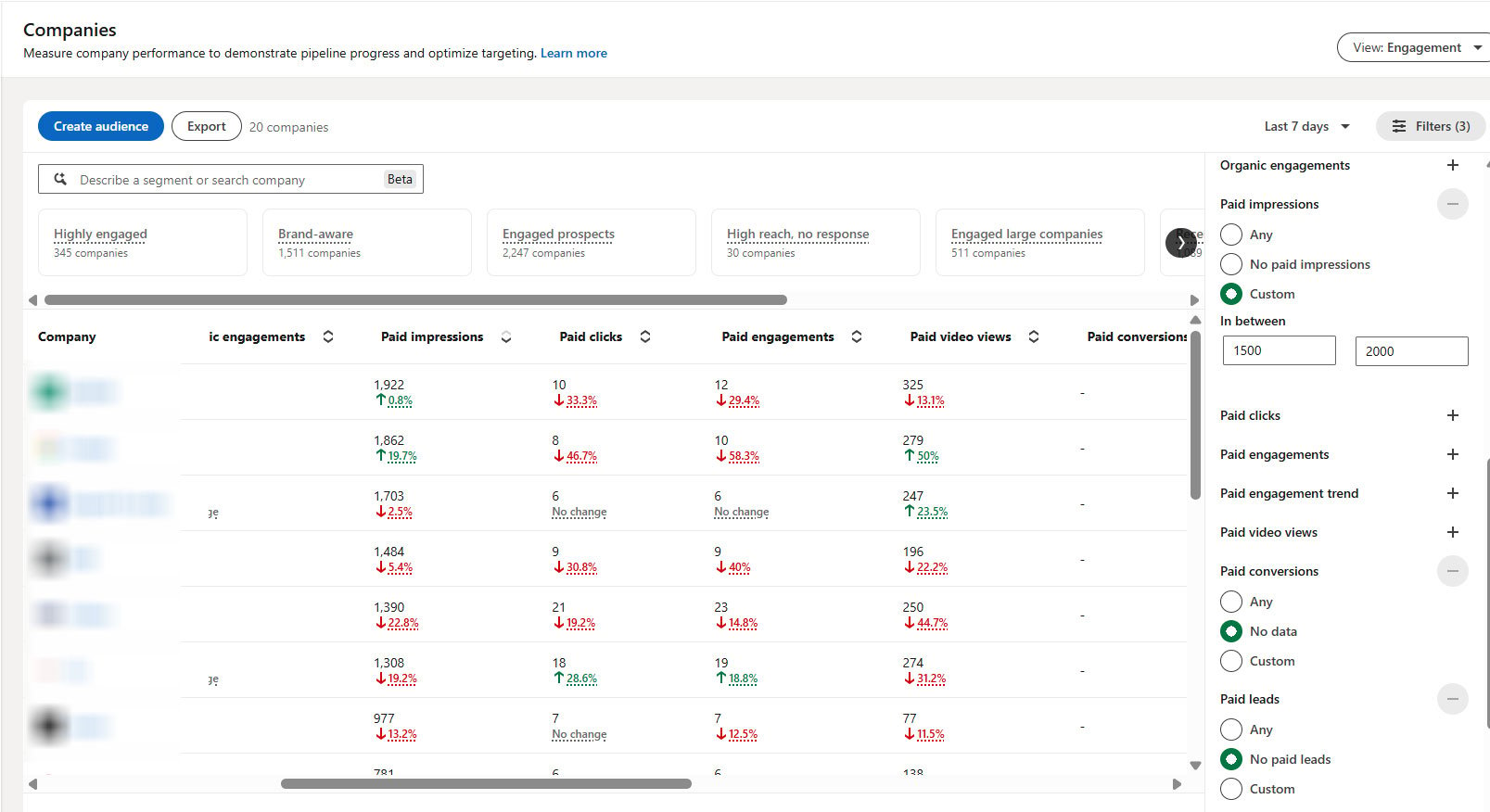
4. Add Paid Leads = 0 and Paid Conversions = 0 when applicable.
5. Consider company size as an additional guardrail if your concern is specifically large enterprise accounts, for example, company size larger than 5,001+.
6. Save the filtered companies as a Dynamic List.
7. Then add that company list as an exclusion to the upper-funnel campaigns where excessive exposure is most likely to occur.
Don't Exclude These Companies From Everything
This is one of the most important parts of the strategy.
A company receiving a lot of impressions isn't necessarily a bad account.
In fact, it might be one of your best target accounts.
The goal isn't:
"They've seen enough ads. Stop advertising to them."
It's closer to:
"They've received enough awareness exposure for now. Give another company a chance, or move this account to the next stage of the funnel."
For example, I might exclude the cooldown list from a high-volume CTV or Video View campaign while still allowing those companies to receive:
Lead Gen offers, website-visit campaigns, case studies, product demos or other lower-funnel messaging.
That turns the strategy into sequencing, rather than simple suppression.
It's also consistent with LinkedIn's own positioning of Companies Hub as a tool for creating full-funnel strategies based on where companies are in their journey.
For more on matching LinkedIn audiences and content to different stages of the funnel, see CommonMind's guide to LinkedIn Ads targeting and our guide to choosing LinkedIn offers by buyer journey stage.
High Impressions Do Not Automatically Mean Ad Fatigue
There is an important nuance to LinkedIn's company-level reporting.
Suppose Company A has 50,000 employees and Company B has 500.
If they both receive 2,000 impressions, those two numbers mean very different things.
Company-level paid impressions tell you how many times employees associated with that company were exposed to ads. They don't tell you that one specific person saw the ad 2,000 times. LinkedIn defines paid impressions in Companies Hub at the company level as the number of times member accounts associated with that company were exposed to your ads.
That's why I'd avoid creating an exclusion based on impressions alone.
The better question is:
Is this company receiving unusually high exposure relative to other accounts while producing little or no downstream response?
That is a much stronger reason to consider a cooldown.
How Do You Know If the Strategy Is Working?
Don't judge the test by whether impressions decline for the excluded companies. That's supposed to happen.
Instead, compare the broader distribution of delivery before and after the change.
|
Metric |
What you want to see |
|
Companies receiving meaningful impressions |
Increase |
|
Share of impressions going to top accounts |
Decrease |
|
Unique reach |
Increase or remain healthy |
|
Average/member frequency |
Stabilize |
|
CTR / engagement |
Remain stable or improve |
|
Leads and conversions |
Remain stable or improve |
|
CPL / cost per meaningful visit |
Remain acceptable |
Run the experiment long enough to see whether LinkedIn actually reallocates those impressions to other qualified accounts rather than simply reducing delivery.
I'd normally give a test like this at least a couple of weeks before making a broader rollout decision.
After my tests, I saw impression concentration decline, with the share of impressions going to the top 10–25 companies falling by roughly 11–12%.
When You Shouldn't Use This Strategy
If you're intentionally running a very narrow named-account ABM program, heavy company-level exposure may be exactly what you want.
Likewise, if a company is receiving a lot of impressions and converting, there is little reason to suppress it solely because its impression count looks high.
The dynamic-exclusion approach makes the most sense when three things are happening together:
High account-level exposure, little downstream response and a meaningful number of other qualified accounts that aren't receiving comparable delivery.
That's when impression concentration starts looking less like intentional ABM and more like inefficient distribution.
Dynamic Exclusions Aren't a Replacement for Good LinkedIn Strategy
LinkedIn's Companies Hub is designed to help B2B marketers understand account engagement and plan a full-funnel strategy.
Using a dynamic company list as an upper-funnel cooldown is an extension of those capabilities.
It won't replace audience planning, creative refreshes, campaign frequency analysis or good budget allocation.
But if a handful of enterprise companies repeatedly absorb a large percentage of your impressions, it gives advertisers another lever that didn't previously exist.
Instead of asking only:
"How often is my audience seeing my ads?"
You can start asking:
"Which companies are receiving those impressions, and should they still be getting them right now?"
That is a much more useful question for B2B marketers trying to balance account penetration, incremental reach and ad fatigue.
At CommonMind, we manage LinkedIn campaigns with both campaign-level performance and account-level delivery in mind. If you're spending heavily on LinkedIn but aren't sure whether your budget is reaching enough of the companies you care about, the Companies Hub is a good place to start.
Frequently Asked Questions
What is a LinkedIn dynamic company list?
A LinkedIn dynamic company list is a saved audience in LinkedIn Campaign Manager that automatically updates based on the filters you define in Companies Hub. For example, you could create a list of companies that received more than a certain number of paid impressions during the last seven days.
Can I use a dynamic company list as an exclusion audience?
A dynamic company list can be used as an exclusion in LinkedIn campaigns once the list is available for targeting. That makes it possible to temporarily suppress heavily exposed companies from selected campaigns without manually maintaining a company list.
How many impressions are too many for one company?
No universal impression benchmark exists because a company with 50,000 employees should naturally receive more impressions than a company with 500 employees. Rather than using a fixed number in isolation, compare a company's exposure with the rest of your target-account distribution and look at whether that exposure is producing clicks, engagement, leads, or conversions.
Should heavily exposed companies be excluded from all LinkedIn campaigns?
Heavily exposed companies usually shouldn't be excluded from every LinkedIn campaign. The goal is to reduce unnecessary repetition, not remove valuable target accounts from the funnel entirely.
We typically prefer applying the exclusion to CTV, Video Views, and high-volume awareness campaigns, while allowing those companies to remain eligible for more intent-driven campaigns such as Lead Gen, case studies, product demos, or website visits.
Is a 7-day or 30-day window better?
For a dynamic cooldown list, seven days is generally more responsive. A company can enter the cooldown list (exclusion audience) after a period of unusually heavy delivery and return relatively quickly once that recent exposure declines.
Share this

How Does LinkedIn Bill For Ads?
Shopping Campaign Now Available on Search Partner Sites